
Your account
Your plan, sites, billing, renewal, support and a lost key, all on GoConsent’s Account tab. No separate login.
There’s no account to sign in to on this website. Your GoConsent Pro account lives in WordPress, on the Account tab of GoConsent, on any site where Pro is activated.
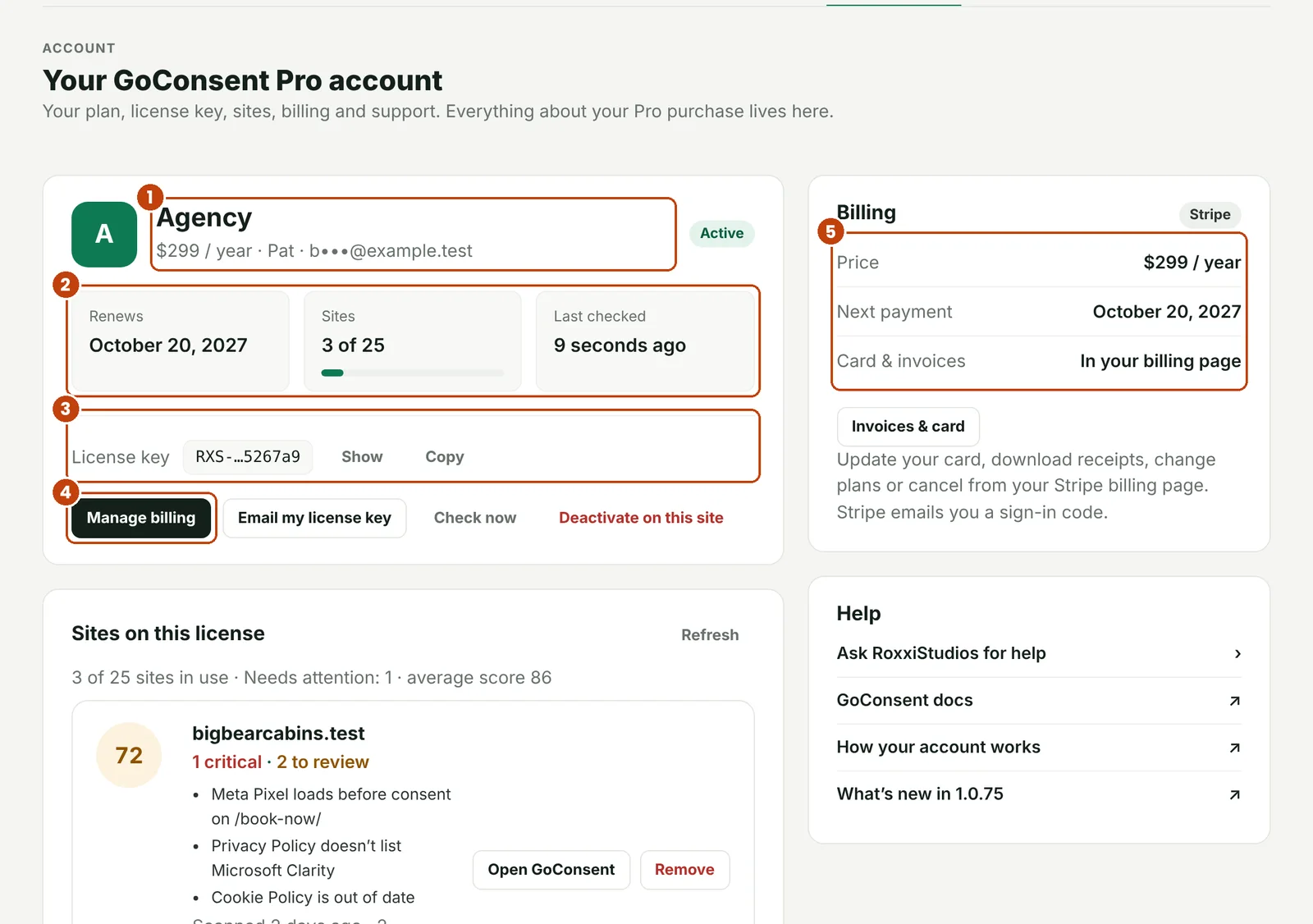
- Your plan, its price and who bought it.
- When it renews, how many sites use it, and when it was last checked.
- Your license key, with Show and Copy.
- Manage billing: update your card, download invoices, change plans or cancel (Stripe’s secure billing page).
- Billing: price, next payment and where your card and invoices are.
- Email my license key sends your key to the email you bought with.
- Check now re-checks the license right away, for example after you renew.
- Deactivate on this site frees this site’s seat for another site.
- Change plan lists every plan with its price. Switch opens your Stripe billing page; Stripe charges or credits the difference for the rest of the year, and your key stays the same.
- On Business and Agency, Sites on this license shows every site on your license.
- Set up by RoxxiStudios, or hosted on RoxxiStudios Managed WP+? The Account tab says so, and there’s no separate GoConsent bill.
Get help
Pro customers ask for help right from the Account tab. Your request goes straight to the RoxxiStudios team with your license, so we know who you are and what you have. Replies show up on the Account tab and in your email.

- New request: a subject and your question. Leave Include site details ticked to send your GoConsent, WordPress and PHP versions, theme and checkup score. No visitor data is sent.
- Each request with its status: waiting for RoxxiStudios, New reply, or Solved. A badge on the Account tab counts new replies.
Open a request to read the conversation and reply. Click Mark as solved when you’re all set; replying again reopens it.
Using the free version, or can’t get into WordPress? Use the support form.
Move a license to another site
On the old site, open GoConsent › Account and click Deactivate on this site, or deactivate the plugin there. That frees the site so you can activate on the new one.
Old site already gone? On Business and Agency, open Sites on this license on any of your other sites and click Remove next to it.
Renewals
Plans renew yearly. If a payment fails or a plan is cancelled, the free features keep working and the pages you’ve published stay on your site. Pro features and Pro updates pause until the license is active again.

To renew an expired license, click Renew Pro on the Account tab. Stripe opens for the same plan, and once you’ve paid, Pro turns back on with the same key. There’s nothing to re-enter.
Billing
Use Manage billing on the Account tab, or the link in your purchase email, to update your card, download invoices, change plans or cancel.
Lost your key
- On a site where Pro is activated: click Email my license key on the Account tab, or Show next to the key.
- On a new site: under Lost your key? on the Account tab, enter the email you bought with and click Email it to me.
Keys are only ever sent to the email address that bought the license. Changed email? Contact support.
Still stuck? Contact support and tell us which page you were on.
