
What visitors see
The cookie banner, its buttons and switches, and the links it carries. Until visitors choose, ad tags are held and maps and videos wait.
New visitors see a compact banner at the bottom of the screen. Until they choose, advertising tags are held, and maps and videos show a click-to-load placeholder instead of contacting Google, YouTube or Vimeo.
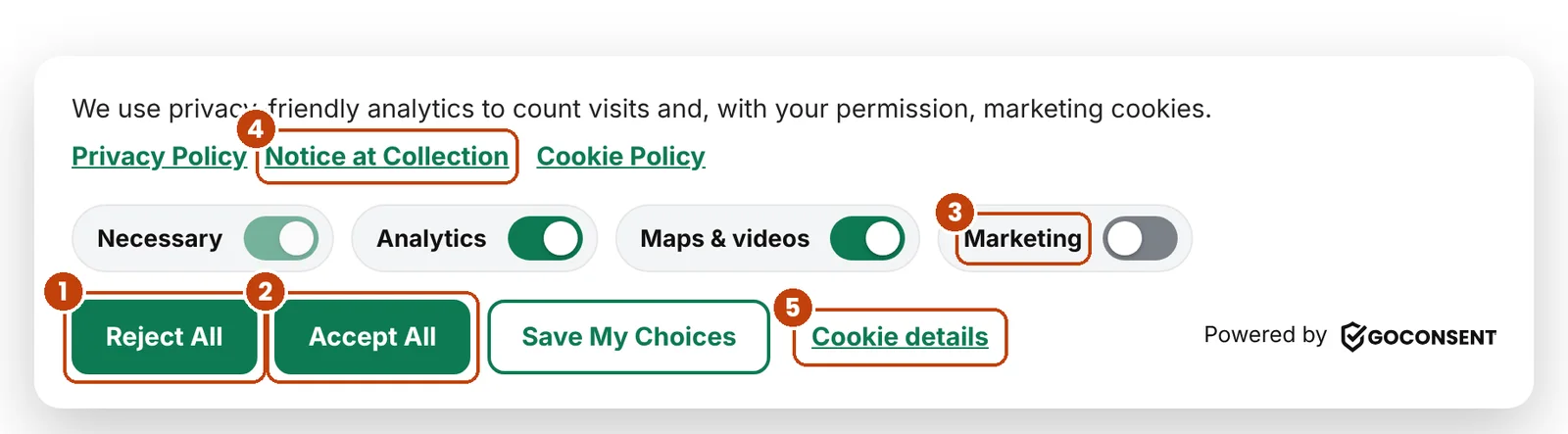
- Reject All: same size and weight as Accept All, as the laws expect.
- Accept All turns every category on.
- Category switches. Marketing is off until the visitor turns it on.
- Links to your Privacy Policy, Notice at Collection and Cookie Policy.
- Cookie details opens Your Privacy Choices.
What the banner offers
- Four switches: Necessary (always on), Analytics, Maps & videos, and Marketing. Visitors can flip them and click Save My Choices.
- Analytics starts on when “Analytics before consent” applies. Google Analytics then counts visits without cookies until the visitor chooses. With “Stricter defaults for EU & UK visitors” on (the default), visitors in Europe start with it off.
- Maps & videos starts off unless you turn on “Maps & videos on by default”.
- Cookie Policy opens a short cookie policy in a pop-up. The Privacy Policy and Notice at Collection links appear once GoConsent finds your privacy policy page.
What happens after a choice
- The choice is saved in one first-party cookie, goconsent, for 12 months.
- Allowed tags load right away, with no page reload. Rejected ones stay blocked. If a visitor turns off something they allowed before, GoConsent clears common tracking cookies and reloads the page once.
- A record is kept as proof of consent: a random Consent ID, the time, the choice, whether GPC was on, the consent version, the page, the browser and an anonymized IP address. Records are kept 24 months.
- A small privacy button stays on every page so visitors can change their mind.
The privacy button opens Your Privacy Choices. With Pro, you can look up a visitor’s record from their Consent ID.
Global Privacy Control
When a browser sends Global Privacy Control, GoConsent treats it as an opt-out of sale, sharing and targeted advertising. Marketing stays off and can’t be switched on, even with Accept All, and the banner tells the visitor: “Global Privacy Control honored.” A signed-in visitor’s GPC opt-out follows them to every device.
When visitors see the banner again
- After 12 months, when their choice expires.
- When you click Re-ask all visitors on the Consent tab, for example after adding a new tool or changing your policy.
You can change the banner’s position and button color, or show no banner to US visitors on sites without ad tags or session recording. See Banner and protection settings. With Pro, you can also set rules by visitor’s region.
Still stuck? Contact support and tell us which page you were on.
