
Run an evidence scan
A clean-browser test of your banner, with a PDF report and recordings for your lawyer.
An evidence scan shows what your site really does for a new visitor, recorded by a browser that isn’t yours. It’s the kind of proof a lawyer asks for when a privacy complaint or demand letter claims your site tracks people without consent.

- Run evidence scan starts it. It takes about 2 minutes; you can leave the page.
- The result: Passed, Failed checks, or Partly tested if the scanner couldn’t find your banner’s buttons.
- Each of the four visits, with a green or red dot. A failed visit lists what it found underneath.
- PDF report opens the plain-English report. All files (zip) downloads everything the scanner recorded.
- Copy share link copies a read-only link you can send to your lawyer or client. It works for 30 days.
The four visits
Each visit uses a fresh browser with no cookies, from the United States, and opens your home page plus up to nine key pages (the same pages the daily scan checks).
- Before a choice: loads your pages and touches nothing. No advertising may load. If you ask before analytics (Consent tab), no analytics may load either; if analytics runs before consent, it may load but may not set cookies.
- After Reject All: clicks Reject All, then browses your pages. Nothing may track.
- After Accept All: clicks Accept All and records what loads, for the record. There’s no pass or fail.
- With GPC: a first visit with Global Privacy Control turned on in the browser. No advertising may load.
What you get
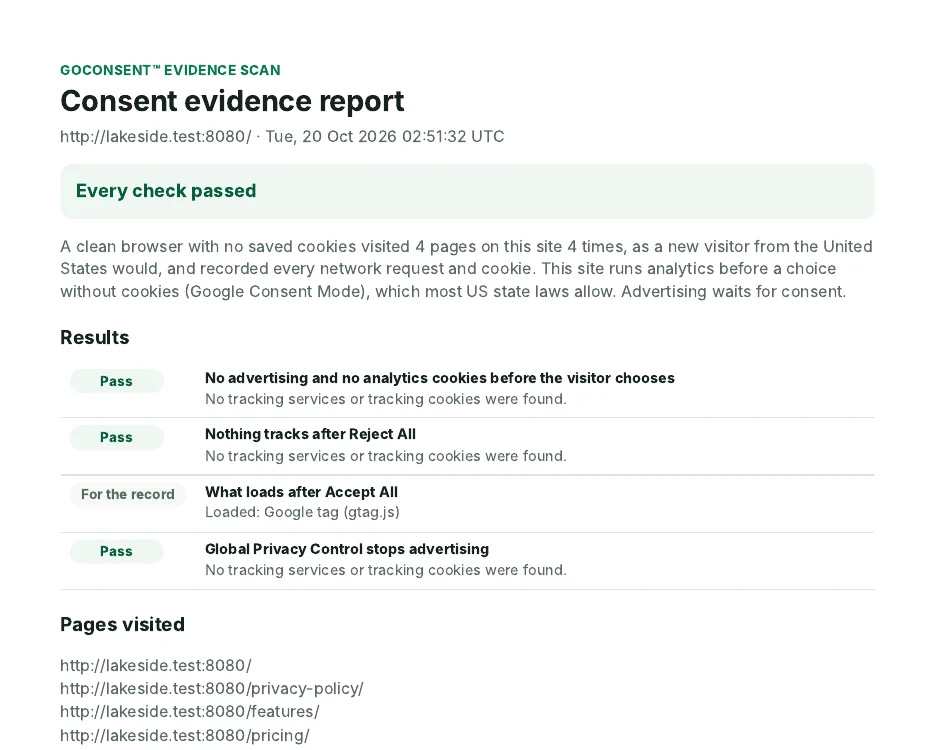
- PDF report: the result of each check in plain English, the pages visited, every third-party host and cookie per visit, a screenshot of your banner, and the chain of custody.
- Recordings (HAR files): one per visit, with every request, header, cookie and timing (page contents aren’t saved). Any browser’s developer tools or a HAR viewer can open them.
- SHA-256 fingerprints: the report lists one for each recording, and the share page one for the whole zip. Change a single byte and the fingerprint changes, so anyone can confirm the files are the originals.
- Share link: a read-only page with the results and downloads. It stops working after 30 days, or when you copy a new one.
Good to know
- Up to 5 scans a day per site. Scans that didn’t finish don’t count.
- Results are kept 90 days, then deleted. Download the zip if you need it longer.
- The scan runs on the GoConsent Scanner, not your server, and only visits your public pages. No visitor data is sent, and the scanner’s visits aren’t counted in your traffic or consent records.
- A failed check names what loaded. Check its category on the Scanner tab, fix it, and run the scan again.
The report records what the scanner saw at that moment. It isn’t legal advice.
Still stuck? Contact support and tell us which page you were on.
